AI Slop Detector - Explain Changes in Cline
What if you could get plain-English explanations for every line of AI-generated code? Meet Cline's Explain Changes feature: your AI slop detector, code review accelerator, and sanity-preservation tool rolled into one.

Cline just touched 47 files, committed 3,284 lines of code, and confidently informed you that your authentication system is "now enterprise-ready."
Do you:
- Merge immediately and pray?
- Spend 4 hours reviewing every line?
- Pretend you understand and hope for the best?
- Call in sick tomorrow when it breaks production?
If you've ever stared at a 2,000-line AI-generated PR and felt your soul leave your body, this post is for you.
The AI Slop Problem is Real (And We're All Victims)
Let’s be honest: AI coding assistants are incredible. They write code faster than we can review it, recognize patterns instantly, and never complain about refactoring legacy code at 2 AM.
But they also produce AI slop.
AI slop is code that technically works but degrades clarity, intent, or maintainability. It’s syntactically valid, often confidently presented and subtly harmful. It looks like progress while quietly increasing cognitive load, review time, and long-term risk.
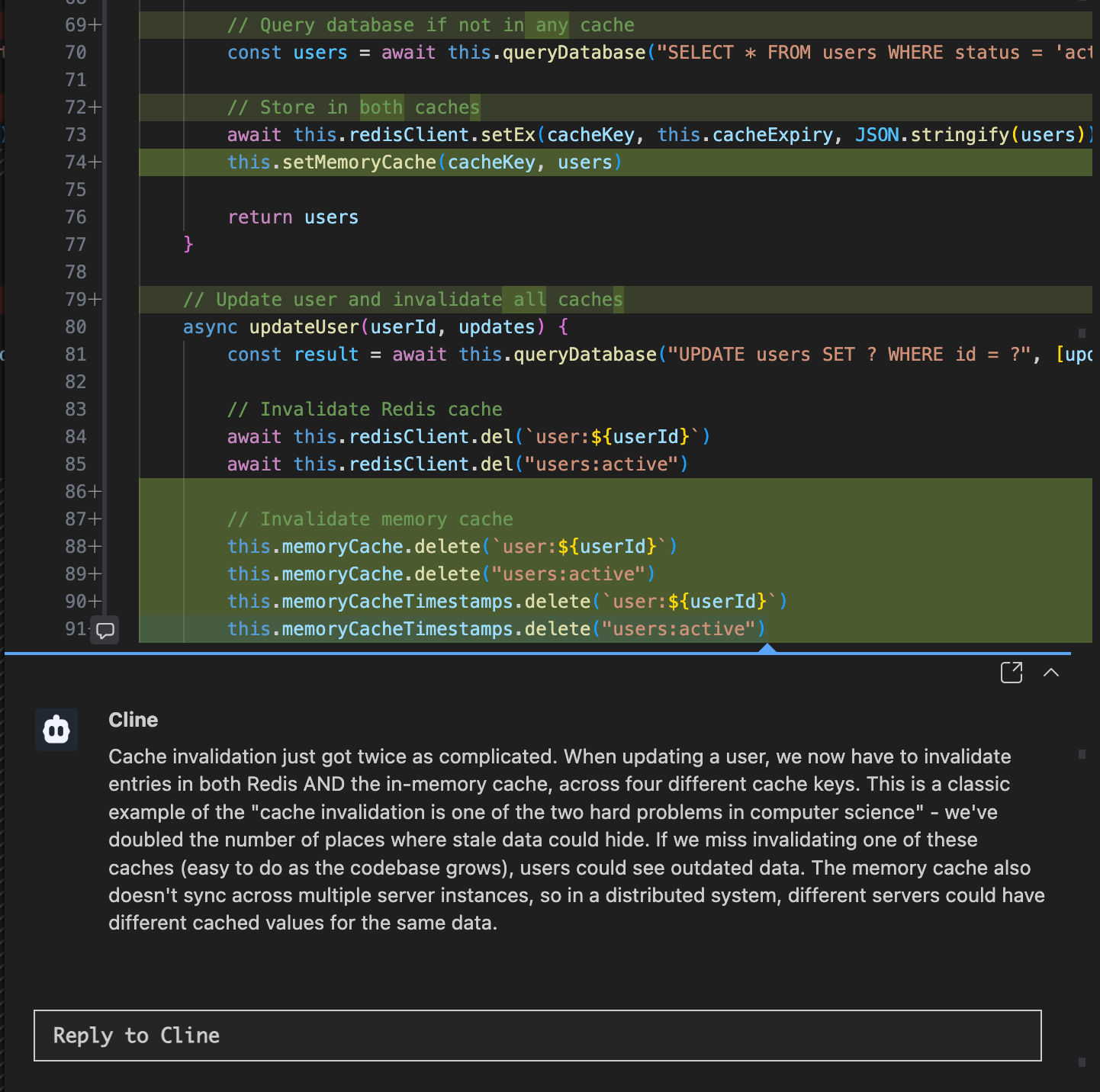
Once you see it, you can’t unsee it:
- Over-engineering simple problems
“I turned your 10-line utility into a 200-line abstract factory with dependency injection.” - Cargo-culted patterns
Redux for a todo list. Kubernetes for a cron job. - Breaking changes disguised as improvements
“I refactored everything!”
“Cool. Why are all the tests failing?” - Verbose cleverness where simplicity would do
Three nested ternaries instead of an if.
Code that works but nobody understands
Including the AI that wrote it.
The worst part? We can't keep up. AI generates code faster than we can review it, creating a bottleneck and trust paradox:
- Junior developers approve AI PRs they don't understand because they trust the AI more than themselves
- Senior developers waste hours doing forensic analysis on AI-generated "improvements"
- Teams accumulate technical debt as mysterious code changes pile up
- Everyone secretly wonders if that one weird refactor will explode in production
Sound familiar? Yeah, we thought so.
The PR Review Nightmare
Let's talk about the elephant in the review room: AI-assisted development has made PRs longer, more frequent, and infinitely more confusing.
The Old Way (Painful)
- Developer writes code manually
- Submits PR with 50 changed lines
- Reviewer reads the code, asks questions
- Approve in 15 minutes
- Ship it
The AI Way (Differently Painful)
- AI writes code in 30 seconds
- Submits PR with 500 changed lines across 15 files
- Reviewer stares at diff for 20 minutes trying to understand the architectural decisions
- Asks AI assistant "Why did you do it this way?"
- AI: "I used industry best practices" (not helpful)
- Reviewer gives up, approves based on vibes
- Ship it and hope
The result? PRs that look impressive but are:
- Elegant solutions that justify the AI subscription (rare)
- Rube Goldberg machines disguised as "enterprise patterns" (common)
- Schrödinger's code: both good and terrible until production proves otherwise (most common)
Introducing: The AI Slop Detector
What if you could get plain-English explanations for every line of AI-generated code—automatically, at the exact moment you need them?
Meet Cline's Explain Changes feature: your AI slop detector, code review accelerator, and sanity-preservation tool rolled into one.
What It Does
Explain Changes generates AI-powered inline comments that explain what changed and why—right in your diff view. Think of it as your AI assistant explaining its own homework.
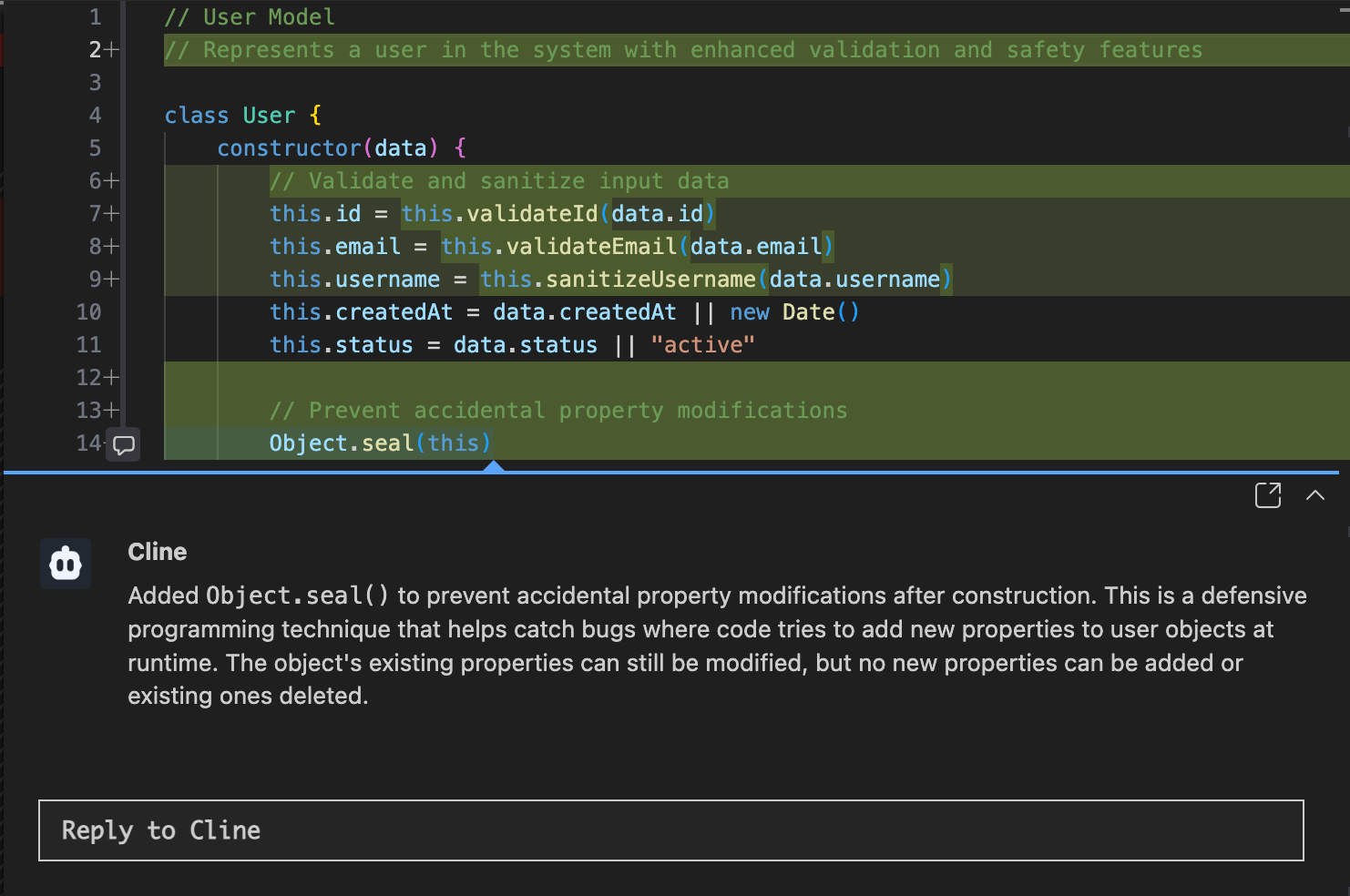
But unlike your AI assistant's usual "I used best practices" hand-waving, these explanations are:
Context-aware: Understands your codebase, not just the syntax
Specific: Explains the intent behind changes, not just what they do
Interactive: Click any explanation to ask follow-up questions
Actionable: Helps you catch slop before it reaches production
Two Powerful Modes
The "Explain Changes" Button
After Cline completes a task, hit the Explain Changes button. It automatically explains everything Cline just did, with inline comments at every change. Trust but verify!
Perfect for:
- Reviewing Cline's work before merging
- Understanding architectural decisions
- Catching over-engineering early
- Learning from the AI's approach
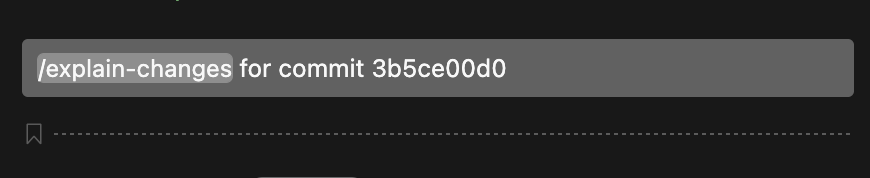
The `/explain-changes` Command
Point it at ANY git diff—commits, branches, PRs, staged changes, even uncommitted work—and get explanations.
Perfect for:
- PR Reviews - Understand your teammate's 1,000-line monster PR
- Debugging - "Which of these 47 commits broke staging?"
- Onboarding - Learn how features were built
- Panic Mode - "What did I change in the last hour?"
How It Solves Real Pain Points
Pain Point #1: Hours Wasted on PR Reviews
Before Explain Changes:
[Stares at 800-line diff for 45 minutes]
"I think this looks good? Probably? Maybe?"
[Approves based on faith alone]
After Explain Changes:
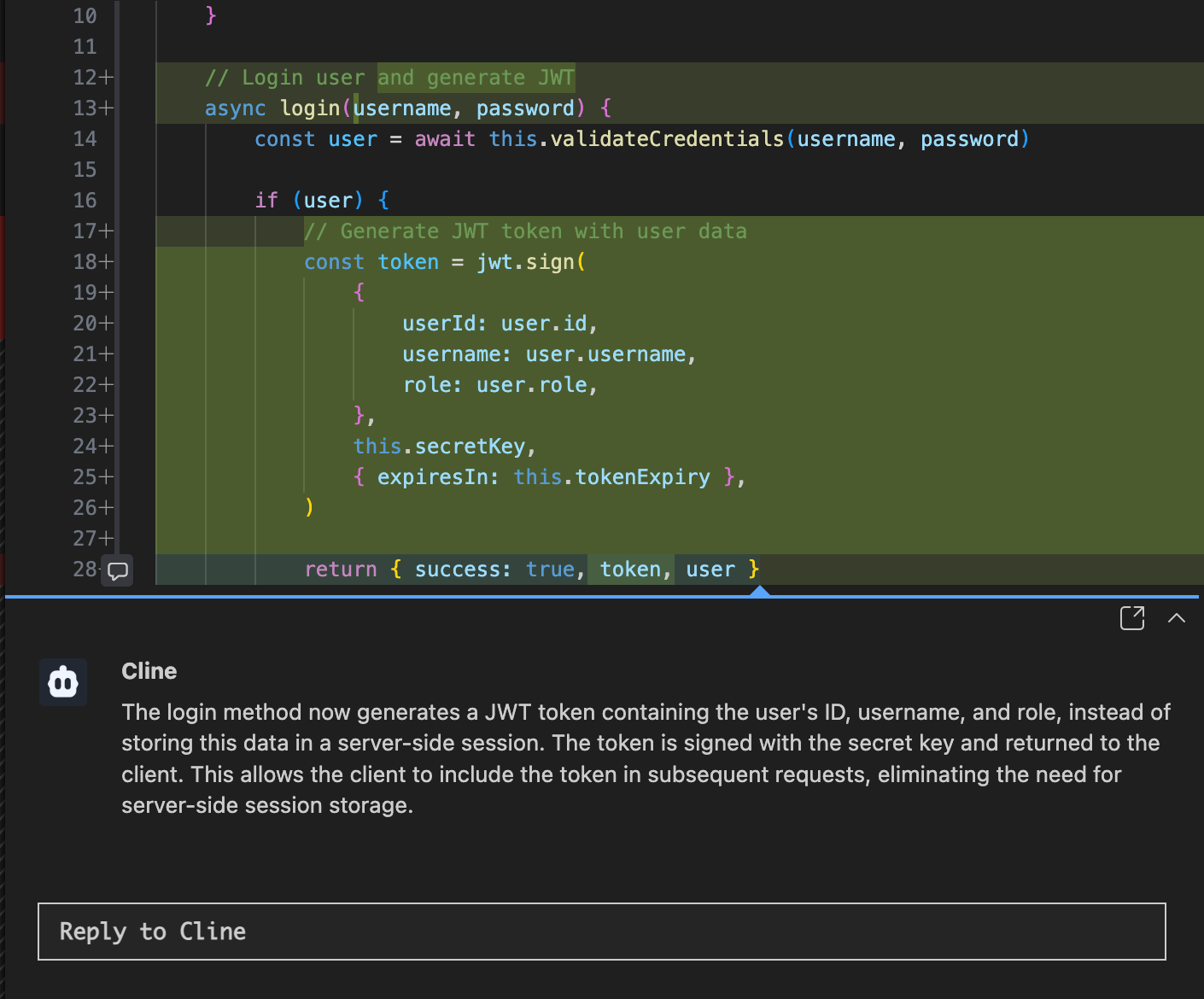
/explain-changes for PR #432
[5 minutes later]
"Oh, this refactors the auth flow to use JWT tokens instead of
sessions. That makes sense. Approved!"
Time saved: 40 minutes
Confidence gained: Priceless
Pain Point #2: AI Slop Sneaking Into Production
Before Explain Changes:
AI: "I refactored the database layer!"
You: "Cool, thanks!"
[2 weeks later: Production is using 10x more memory]
You: "Why did you add a cache to the cache?"
AI: "I don't remember, that was 2 weeks ago."
After Explain Changes:
AI: "I refactored the database layer!"
You: [Clicks Explain Changes button]
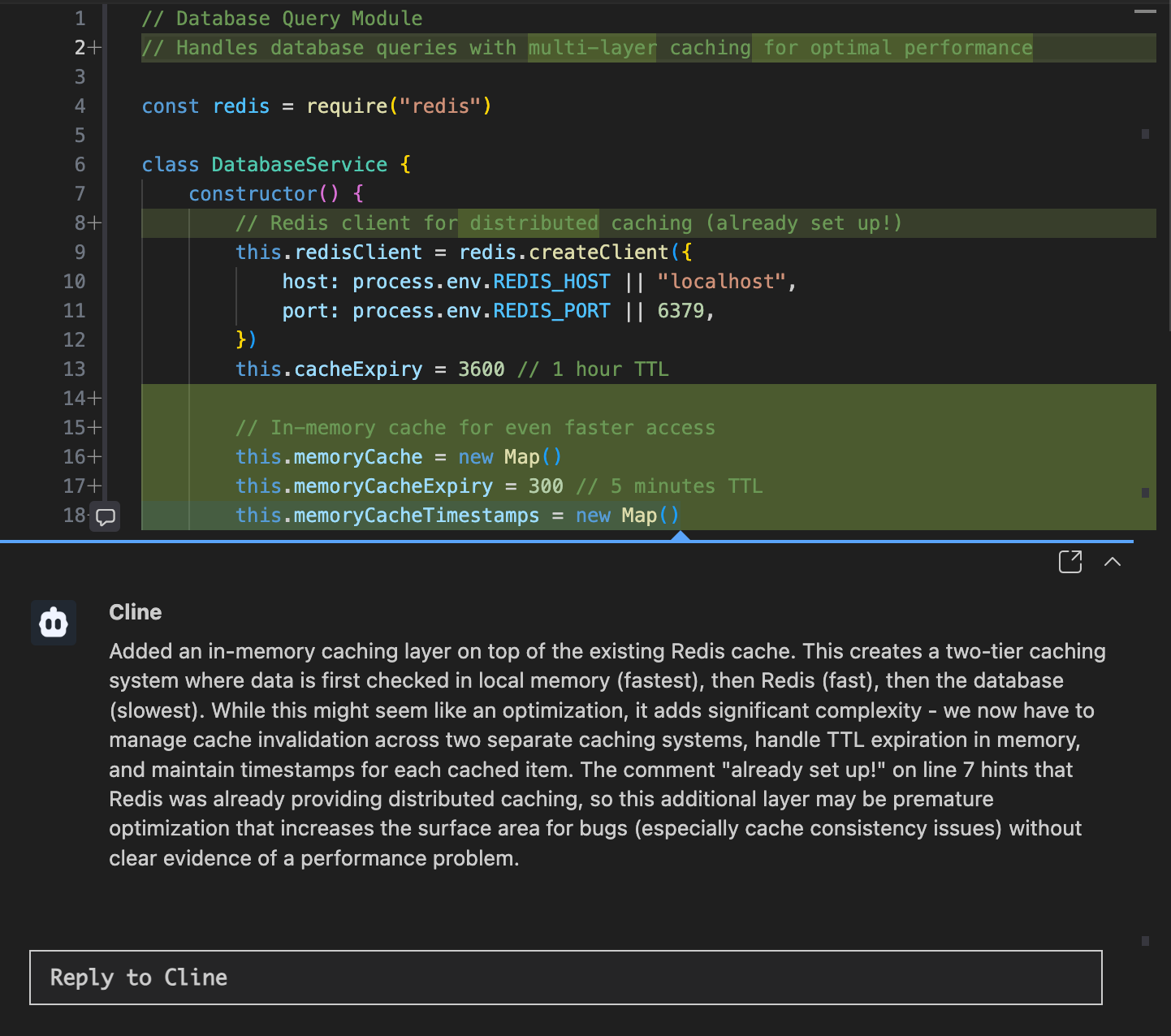
Explanation: "Added caching layer to cache query results..."
You: "Wait, we already have Redis. Why do we need another cache?"
[Catches the slop before merging]
Slop prevented: 1 production incident\
Sleep quality improved: Significantly
Pain Point #3: Junior Devs Approving Mystery Code
Before Explain Changes:
Junior Dev: "This PR looks... professional? There are a lot of design patterns I don't recognize. I'll approve it!"
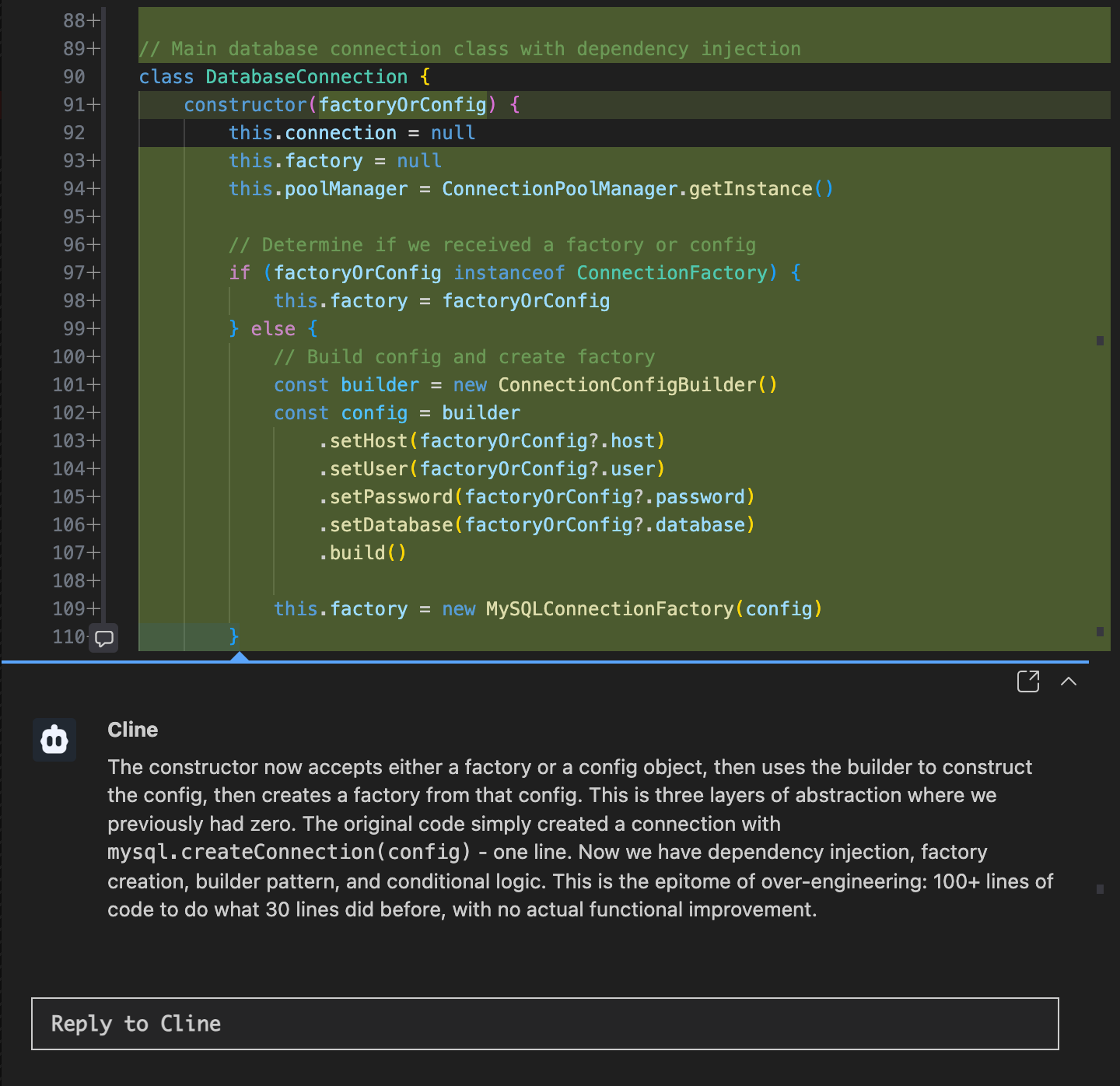
[Merges a Singleton AbstractFactoryFactory]
After Explain Changes:
Junior Dev: [Reads inline explanations]
"Wait, why do we need a factory for a factory? This is just creating a database connection..."
[Asks for simplification]
[Learns something]
Career disasters averted: One
Learning moments created: Many
Pain Point #4: "What Did I Even Change?"
Before Explain Changes:
[After 3 hours of AI-assisted coding]
You: "Okay, time to commit..."
[Looks at git diff]
You: "What is... any of this? Did I do all this?"
[Commits with message: "fixes and stuff"]
After Explain Changes:
/explain-changes for my uncommitted work
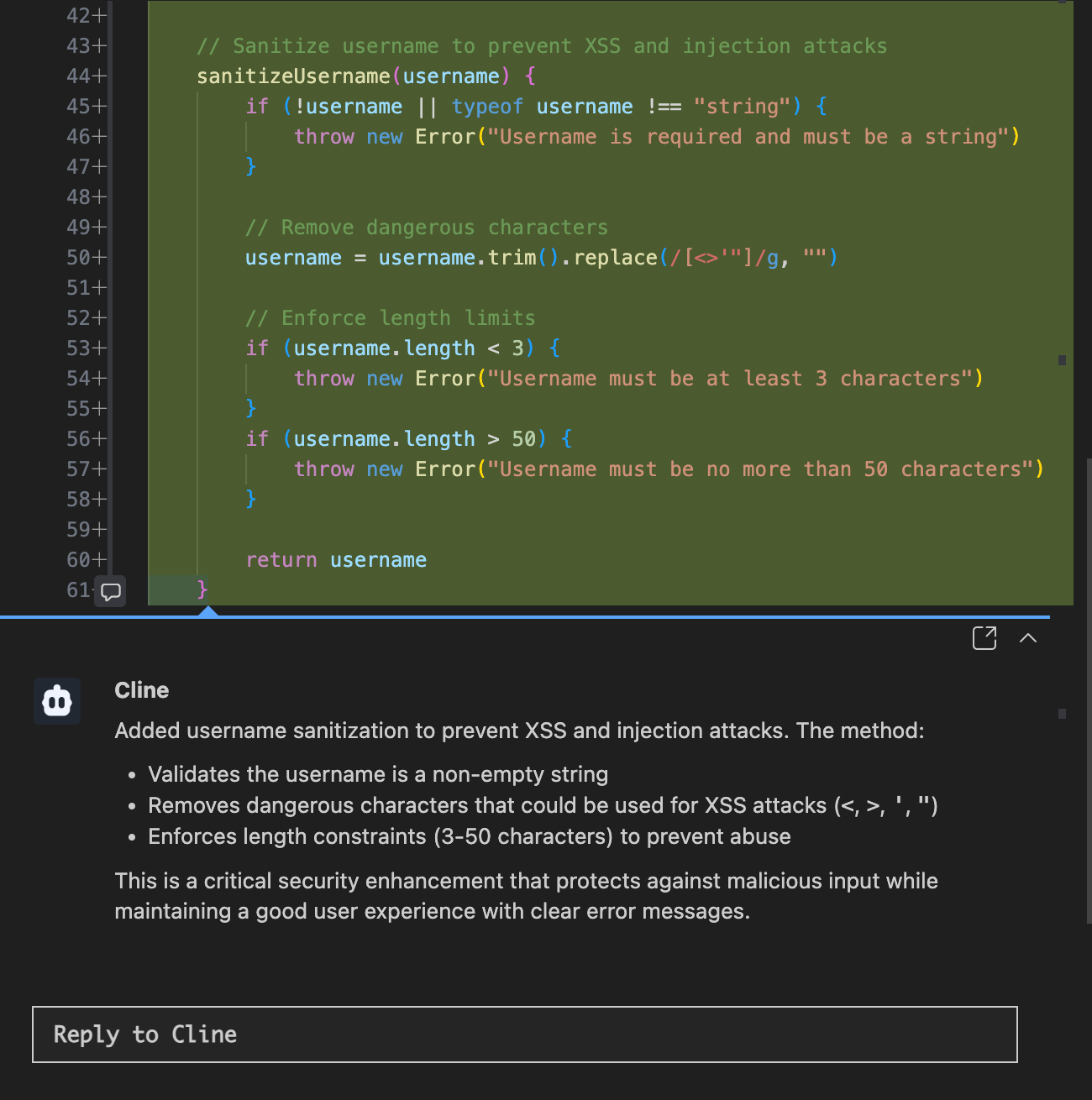
[Reads explanations]
"Oh right, I refactored the user model, added validation, and fixed that race condition. Cool."
[Writes meaningful commit message]
Commit message quality: 10x improvement
Future you's gratitude: Immense
How to Use It (It's Stupid Simple)
Quick Start
For Cline's Own Work:
- Let Cline complete a task
- Click the Explain Changes button
- Review the explanations before merging
- Ask follow-up questions on any confusing parts
For Any Git Diff:
/explain-changes [describe what you want explained]
Real Commands You Can Try Right Now
Review yesterday's commits:
/explain-changes for my last 3 commits
Understand that PR everyone's afraid to review:
/explain-changes for PR #666
Figure out what merged from that feature branch:
/explain-changes between main and feature-auth
See what you've been working on:
/explain-changes for my uncommitted work
Compare releases:
/explain-changes from v1.0.0 to v2.0.0
Debug specific files:
/explain-changes for src/auth in the last 5 commits
The Secret Sauce: Context-Aware Intelligence
Here's why Explain Changes is different from just reading git diffs or commit messages:
It Understands Your Project
The more Cline knows about your codebase, the better the explanations:
- References architectural patterns you've discussed
- Explains why certain approaches were chosen over alternatives
- Relates changes to previous conversations
- Understands the business logic, not just the syntax
It's Interactive
Don't understand an explanation? Click it and ask:
- "Why did you choose this approach?"
- "What's the performance impact?"
- "Could this break existing functionality?"
- "Is there a simpler way to do this?"
It Catches Slop Before Humans Can
AI-generated explanations are surprisingly good at revealing AI-generated slop:
- Over-complicated explanations = over-complicated code
- Vague justifications = probably unnecessary changes
- "Used best practices" = red flag for cargo cult coding
Pro tip: If the AI can't explain why it did something in plain English, it probably shouldn't have done it.
Pro Tips for Maximum Slop Detection
1. Be Specific With Your Requests
Bad: /explain-changes
Good: /explain-changes for the authentication refactor in PR #42
More context = better explanations.
2. Ask About Intent, Not Just Implementation
Don't just read what changed. Ask why:
- "What problem does this solve?"
- "Why was this approach better than the alternative?"
- "What's the trade-off here?"
3. Use It to Catch Your Own Slop
Let's be honest: humans write slop too. Use Explain Changes on your own commits:
/explain-changes for my last commit
If you can't explain it to yourself, it's probably too complicated.
4. Make It Part of Code Review
New team workflow:
- AI generates code
- Use Explain Changes to review
- Ask clarifying questions
- Approve with confidence (or reject with reasons)
Result: Faster reviews, less slop, more learning.
5. Use It for Onboarding
New to a codebase? Learn by explaining:
/explain-changes for the PR that added webhooks
/explain-changes between v1.0 and v2.0
/explain-changes for the last 10 commits in src/auth
It's like having a senior developer explain the codebase—except available 24/7 and never annoyed by "dumb questions."
Try It Now (Seriously, Right Now)
The best way to understand Explain Changes is to use it. Here's a 30-second challenge:
- Open Cline in your project
- Type:
/explain-changes for my last commit - Watch what happens
Chances are, you'll either:
- Learn something you didn't know about your own code
- Find a bug you were about to commit
- Discover that you accidentally wrote some slop yourself
(We won't judge. We've all been there.)