Meet The Deep Thinker: Make the most out Claude Opus 4.6 in Cline
Anthropic's most intelligent model is now in Cline. We've been testing Claude Opus 4.6 across the extension and the CLI. Here's why we're calling it The Deep Thinker.


Anthropic just released Claude Opus 4.6, their most intelligent model to date. We've been calling it The Deep Thinker, and once you use it you'll understand why. This model reasons through complexity before it acts, understands what you mean even when you don't say it perfectly, and ships clean work with less oversight than anything we've tested before.
It's available now in Cline across VS Code, JetBrains, Zed, Neovim, Emacs, and the Cline CLI. Here's what we found, what the benchmarks actually mean for your workflow, and how to get the most out of it.
What makes Opus 4.6 different
Opus 4.6 is a direct upgrade from Opus 4.5, which was already one of the strongest coding models available. The headline improvements are in reasoning, long context, and agentic task execution.
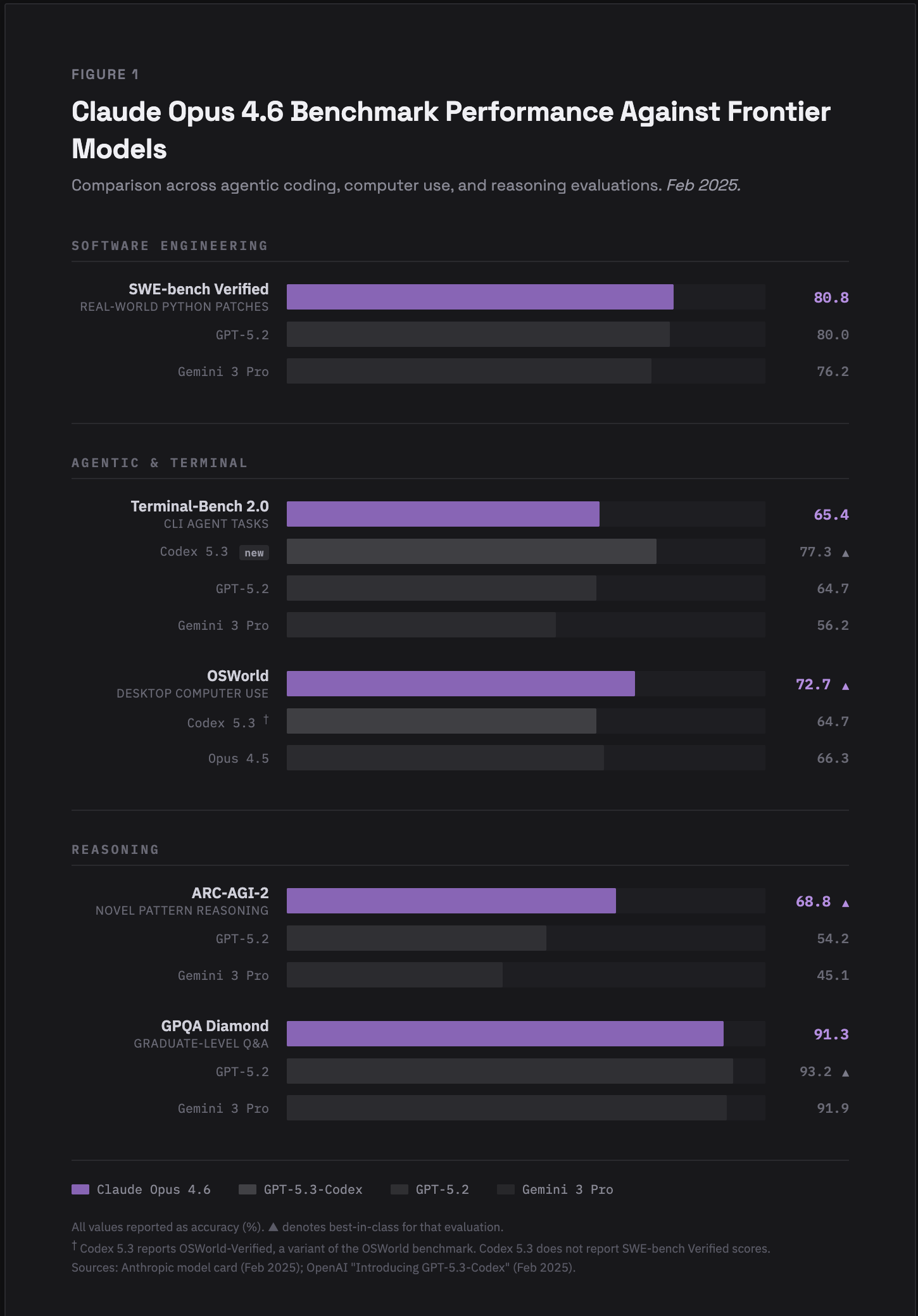
Pricing stays the same as Opus 4.5: $5/$25 per million input/output tokens.
How Opus 4.6 actually feels in Cline
Benchmarks are useful, but they don't tell you what it's like to work with the model day to day. We spent time with Opus 4.6 across both the VS Code extension and the Cline CLI. Here's what stood out.
It gets what you mean
This is the first thing you'll notice. Opus 4.6 is better at understanding the intention behind your prompts, even when the prompt itself isn't perfectly structured. You can be vague, you can ramble, you can half-explain what you want, and the model fills in the gaps correctly.
This matters more than it sounds. Instead of spending time crafting the perfect prompt, you describe what you want in natural language and the model figures out the rest. When it does need clarification, it asks specific, useful questions instead of guessing wrong.
We tested this with voice-to-text input and it worked surprisingly well. You can talk through your plans with the model before committing to action. The model listens, asks good follow-up questions, and then executes. It felt like planning a task with a teammate instead of writing instructions for a machine.
Communication is clean
The model's responses through Cline are precise. No fluff, no walls of text explaining things you already know. You get the information you need to stay on top of the task without scrolling through paragraphs to find the key detail.

This is a quality-of-life improvement that compounds over a full day of work. Less time parsing model output means more time actually shipping.
Refactoring and long projects
Opus 4.6 handles large refactoring jobs and long-running projects noticeably better than its predecessor. The 1M token context window means it can hold your entire codebase in memory. Combined with the improved reasoning (that ARC-AGI-2 jump is real), the model makes more coherent decisions across multi-file changes.
If you've been putting off a big refactor because you didn't trust the model to keep track of everything, this is the one to try it with.
Better design taste
This one surprised us. When generating UI code, Opus 4.6 produces more cohesive, modern designs. The output feels more thought-through, like someone actually considered how elements relate to each other rather than throwing components on a page. If you're building frontends with Cline, the quality jump is noticeable.
Where Opus 4.6 really shines: the Cline CLI
This is where the model gets interesting. The Cline CLI lets you run Opus 4.6 from your terminal with full agentic capabilities. And this model's decision-making in autonomous mode is a step above what we've seen before.
Autonomous task execution
Opus 4.6 makes better autonomous decisions about what tasks need to be done and in what order. When you give it a goal, it breaks the work down, navigates between files, runs commands, and makes progress without needing you to babysit every step.
Using Cline's auto-approve feature with Opus 4.6 was a turning point. The model needed less oversight, which meant we could kick off a task, work on something else, and come back to find the work done correctly. That's a real productivity multiplier.
Less is more
Remember how the model fills in gaps in prompts? This is even more valuable in the CLI. You can give shorter, more natural instructions and the model interprets them correctly. No need to over-specify every detail. Just describe the outcome you want and let it work.
This "less is more" approach changes how you interact with the CLI. Instead of writing detailed step-by-step instructions, you write a brief and let the model figure out the execution plan.
Adaptive thinking
Opus 4.6 introduces a new adaptive thinking mode. The model self-calibrates how much reasoning to invest based on task complexity. Simple tasks get fast responses. Complex tasks get deeper thinking.
The tradeoff with Opus 4.6
It's in the name. Opus 4.6 takes longer to think than some lighter models. When the model is working through a complex task, there can be a pause before you see output. This isn't the model being stuck. It's deep thinking doing its job. The self-calibration helps here (simple tasks are still fast), but if you're used to instant responses on everything, expect a tempo change on harder problems.
For quick, iterative tasks where speed matters more than depth, Sonnet is still the right choice. Opus 4.6 is the model you reach for when the task is hard and you need it done right.
When to use Opus 4.6 vs Sonnet
Reach for Opus when the task is hard. Complex refactors, multi-file changes, debugging something gnarly, root cause analysis, or anything where you need the model to hold a lot of context and reason through it carefully. It's also the one you want for autonomous CLI work where you need fewer interruptions, and for frontend generation where design quality matters.
Reach for Sonnet when you need speed. Fast iteration cycles, straightforward tasks, or anything where quick turnaround matters more than deep reasoning. Both models are available in Cline. Pick the right tool for the job.
How to use it
Select claude-opus-4.6 from the model picker in Cline. Works with your Anthropic API key.
In the extension: Available in VS Code, JetBrains, Zed, Neovim, and Emacs.
In the CLI: Install or update the Cline CLI and select the model. If you want to take advantage of the autonomous capabilities, try enabling auto-approve and letting the model handle a refactoring task or a multi-file feature build end to end.
Try The Deep Thinker
Opus 4.6 is available now. Go throw your hardest task at it and see what happens. We're curious what you're building with it. Drop by Discord and share what you find in the Opus 4.6 Feedback channel.