The architecture that gets AI coding tools approved

There's a growing assumption that AI coding assistants are fundamentally incompatible with regulated environments. This belief usually stems from how most AI tools are architected, not from AI-assisted development itself.
Security constraints in these environments are real and non-negotiable. Restricted networks, strict compliance requirements, long approval timelines, and zero tolerance for opaque SaaS dependencies. Whether you're building software that handles financial transactions, processes healthcare data, or operates in government cloud environments, most commercial AI coding tools fail immediately under these conditions because they were never designed to operate inside them.
The thesis is simple: AI is not the security risk. Poor architectural boundaries are.
Why most AI coding tools get rejected
Most AI coding assistants are blocked for predictable reasons. Source code gets sent to third-party SaaS platforms by default. Data flow is opaque or poorly documented. The tools depend on unrestricted internet access. There's no clear boundary between assistive and autonomous behavior. Security teams can't audit or reason about the system.
The result is familiar. Developers are told to choose between productivity and compliance. Security teams shut the tools down, developers go back to manual workflows, and everyone loses.
This is not an inherent flaw in AI-assisted development. It's an architectural failure.
What secure deployment actually requires
Any AI system deployed in a high-security environment must keep source code within the approved security boundary, eliminate unmanaged SaaS dependencies, and provide deterministic, inspectable execution paths. Human-in-the-loop must be the default, not an afterthought. Inputs and outputs need clear auditability. The system should operate under Zero Trust assumptions and fit within existing DevSecOps pipelines rather than bypassing them.
Any tool that cannot operate within these boundaries should not be deployed, regardless of how impressive it looks in a demo.
Why Cline is architecturally viable
Cline differs from many AI coding tools in ways that matter specifically for regulated and high-security settings.
It runs locally inside the developer's IDE with no external indexing service and no background sync to cloud infrastructure. The model provider is abstracted, meaning inference can occur on-prem, in your private cloud, or through approved endpoints without changing developer workflows. The codebase is open source, so security teams can audit exactly what the tool does rather than trusting vendor documentation.
Cline's behavior is transparent. Developers see what context is assembled before it's sent for inference. Plan and Act modes give explicit control over when the tool is gathering information versus taking action – you can read more about this in our Plan & Act documentation. Most importantly, Cline behaves like a developer assistant, not an autonomous agent. It does not commit code, deploy artifacts, or execute actions without explicit human involvement.
That distinction is critical for security approval.
How the data flows
A typical interaction works like this. A developer invokes Cline inside the IDE. Context is assembled locally from files the developer already has access to. Relevant snippets are sent to your inference endpoint – which lives inside your security boundary. The model processes the request. The response returns to the IDE. The developer reviews and applies changes manually. Code proceeds through the normal DevSecOps pipeline.
At no point does Cline act independently, commit code, or bypass existing controls. Code never leaves your approved environment.
Quick start with Ollama
For individual developers who want to evaluate this architecture before proposing it to their organization, you can run Cline entirely offline in under 10 minutes. No cloud dependencies, no API keys, no data leaving your machine.
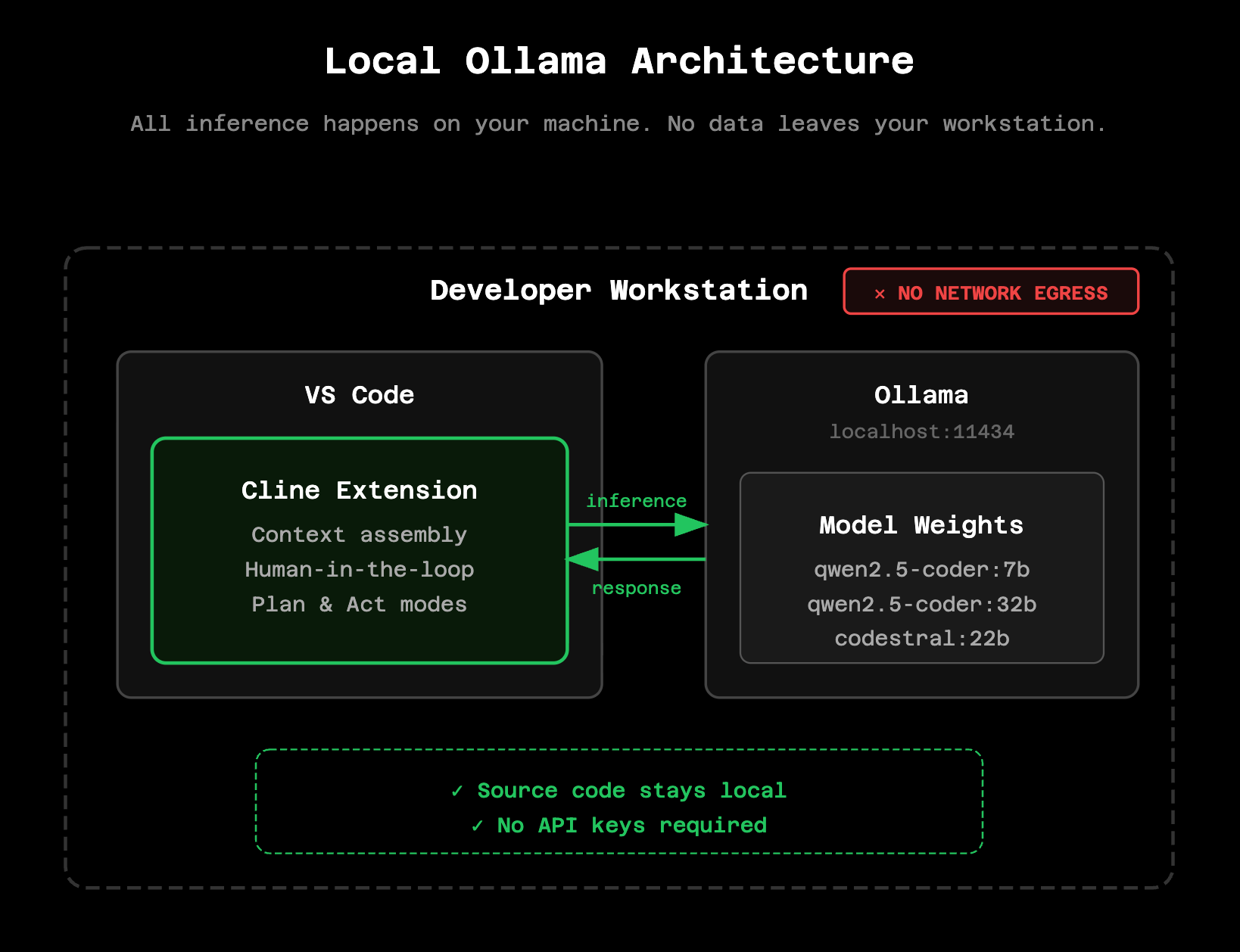
Install Ollama by visiting https://ollama.com and downloading for your operating system. Then pull a coding model:
ollama pull qwen2.5-coder:7bFor more complex tasks on hardware with sufficient VRAM (16GB+), use the larger variant:
ollama pull qwen2.5-coder:32bIn VS Code, open Cline settings and configure Ollama as your API provider with `http://localhost:11434` as the base URL. Select your downloaded model and you're ready to go. All inference happens locally – you can verify this by checking network traffic or simply disconnecting from the internet.
For detailed setup instructions, see our [Ollama documentation](https://docs.cline.bot/running-models-locally/ollama) or the [local models overview](https://docs.cline.bot/running-models-locally/overview).
Model recommendations
For local evaluation, qwen2.5-coder:7b works well on most modern laptops with 8GB+ RAM. Responses are fast and quality is sufficient for straightforward coding tasks. The 14b variant requires 16GB+ RAM and a capable GPU but offers noticeably better complex reasoning. For production local deployments where security requirements prohibit any external inference, qwen2.5-coder:32b or codestral:22b require serious hardware (32GB+ RAM, dedicated GPU) but approach the quality of commercial API models.
Note that model weights need to be sourced through your approved software supply chain for production deployments. Ollama pulls from public registries by default; your security team may require hosting model weights on internal infrastructure.
Security review framing
From a compliance perspective, Cline should be framed as a developer productivity tool, not an autonomous system. Does it store source code? No. Does it transmit source code externally? No – only to inference endpoints within your approved boundary. Can it act without human approval? No.
Because the tool has clear boundaries and no hidden behavior, it is significantly easier to evaluate than opaque SaaS-based alternatives. Security teams can audit the open source codebase. Platform teams can verify network traffic patterns. The data flow is explicit and inspectable.
This clarity is what shortens approval timelines. When security reviewers can reason about exactly what a tool does, they can approve it. When they can't, they block it. Most AI tools get blocked not because AI is inherently risky, but because no one can explain what the tool actually does with your code.
Why this improves security
Used correctly, an AI coding assistant can improve security outcomes rather than degrade them. Fewer insecure copy-paste patterns from random sources. Earlier detection of risky logic during development. More consistent application of coding standards. Reduced developer fatigue, which is a real risk factor for security mistakes. Higher-quality code entering security review pipelines.
Security teams gain signal instead of noise.
When you're ready to scale
Local Ollama evaluation demonstrates that the architecture works. But individual developers manually configuring their own inference endpoints doesn't scale to teams or organizations.
Cline Enterprise provides the platform layer that makes this architecture production-ready. Centralized model endpoints eliminate per-developer configuration. Team usage tracking gives visibility into which models are being used, by whom, and for what. SSO integration connects to your existing identity provider. Compliance-ready audit trails provide the documentation your security team needs for ATO packages and compliance certifications.
If you've validated the local architecture and want to discuss deploying Cline across your organization, reach out at https://cline.bot/enterprise.
For community discussion and implementation patterns, join us on Discord or share your experience on Reddit. The documentation covers enterprise deployment patterns in more detail.